Friday, October 03, 2014

8 Tips for Better SEO for Startups

Startups are already bootstrapped and work on tight budgets. The co-founders work under immense pressure to get their idea to become a viable and profitable business. They focus more on product development and sales. Little or no focus is on website. Search Engine Optimization (SEO) is more economical and time consuming. But, if perfectly done then, it will pay off in a long run.

Here are simple 8 tips which involves little or no investment but, a bit of effort for startups to promote their business online.

1. On-page Optimization: To start with the on-page optimization need to be done perfectly. Identify the right and perfect keywords. I would suggest to target more on long-tail keywords. This will help in 2-ways. One, the competition for long-tail is less and it will be easier to rank on top in search engines. Two, it will attract the right audience for you business and the conversions are easy and quick. On-page optimization the very first and important step for SEO. A mistake done here will consume lot of time to correct it. As you will be on the wrong track from the start. Note that the objective here is just not to rank on top in Google. But, the website should rank on top in Google for the right keywords and phrases.

Weston Bergmann, lead investor in BetaBlox, which is an equity-based business incubator for startup entrepreneurs in Kansas City, compares SEO to a marathon:

"The most important thing to note about SEO for early-stage ventures is it's a marathon, not a sprint. I see too many people getting frustrated by a lack of stellar results in the first couple months, when this just isn't possible. These fights are long-term ones, so buckle down and stick to the basics. Eventually you'll look back and see that you've built a monster."Search Engine Optimization Bible written by Jerri L. Ledford, is a very good book to know and learn the basics of SEO. This book offers readers about what they need to write a SEO plan and implement a successful SEO program. It also provides useful and easy tips on getting the website to the top on SERPs, The sidebars provide more information and additional resources on the topic which are very helpful to a rookie.

2. Mobilize, Localize and Socialize: If your business is focus on your local area, try to have the content more relevant to the local area. It is always better to be on all the Google properties like YouTube, Google+, Google Places... Have a mobile friendly website / webpage as well. 
 
3. Launch Blog and Keep Writing: I am sure this is the one which will be ignore by most of the startups as this is more time consuming. But, this step is the next step for effective SEO after the #1 above. Search engines want to see more of fresh and quality content. Make sure the topics, titles and the posts again include the right keywords as far as possible.

Secondly, it is not necessary that the co-founders should only write the articles and post it. You can assign and pick someone within the organization or have a freelancer to write.

Lastly, have an option to share the blog articles over the social media. As the more the articles are shared and viewed, the more help it will do for SEO. For more details refer my article 'Is Content Still King?'.
 
4. Social Media Marketing (SMM): The content / webpage which is more talked and discussed about in the social channels is of more help in SEO. Be it a blog post, video, image, website link or a post in the social channel. Having something viral in the media will boost the search engine rankings. This does not just mean that you make a few post daily and it is done. One needs to check the followers, respond to comments. Also, need to see the mentions of the name of the startup or the business and initiate the conversation. The mentions in the social media are the right signals for the business.

I understand, this eats away lot of the valuable time. But, keeping aside an hour of your daily time for this will be beneficial for a long run. I would suggest not to outsource this to any agency as I believe, you are the one who knows the business well and understand the customers. Thus, the timely interactions can be properly done by you and will be effective. An hour a day is what is required.

Do not miss to read 'The Four Important Steps to Start Social Networking for Business'.

Also, one can answer related questions to their industry and business on Quora.com. Not only answer but, can ask relevant questions as well. Never know from where we can get traffic and customers. 
 
5. Startups Directories: There are many directories were the startup can be submitted. There are tons of them. But, I would suggest just pick the top few ones and submit your startup to them with a proper description and tags. Joining sites like Angel.co and Crunchbase.com will help. There are other few directories like Betali.st, Erli Bird, CSS Mania and more. Comprehensive list and experience of a startup is nicely given by RivalFox in the article 'Startup Directories: The Good, The Bad, and The Ugly'
 
6. News Media: When your product is almost ready and you are ready to spread the news about the startup do take help of the news channel. The timing needs to be right. Just do not be too early to disclose the idea and attract competition. Like directories, we have many news websites which give news related to startups and most of them do it for free. Here as well just focus on few good ones like Mashable, Venturebeat, Startupbeat, YourStory, Inc.com, Entrepreneur.com, Alltop....
 
7. Guest Blogging: Apart from the news channels, there are other bloggers who are interested to write about startups. It is just not about startups, but bloggers who write about the industry related to your business will also help.

Weston Bergmann of BetaBlox opines about guest blogging and he had this to add:

"Recently I've heard a lot of people say that guest blogging is dead. Well it's not. What's dead is spammy and manipulative link building techniques. What's more important than ever is high-quality guest blogging and thought leadership. If you're sharing high quality and exclusive content you'll be rewarded, not punished. Also, guest blogging shouldn't be a one-and-done thing; aim to write for the same publication multiple times."
 
8. Analytics and Metrics: Do not forget to analyze the traffic stats and the sources of these traffic. See which traffic is being converted and focus on generating more traffic from these sources. Google Analytics is the best free tool available and to start with the numbers which it provides is apt. If the numbers are read and interpreted well then, it will save lot of efforts and cost to the startup. This step is always ignored by most of the businesses.
 
Whether it's for a startup or a new business, these simple 8 steps will help your SEO or digital marketing efforts to be more successful. Of course, once you launch a business the keywords and content your care about may change, but the game remains the same.

Work at a startup? Ask questions or share your own experiences in the comments!


Sunday, September 14, 2014

Is Content Still KING?

You must have seen many blogs have sprang the web. Why? As the content is king. Is it really still the King? Just content can't be king. Search engines algorithms are smarter and it just does not depend on content. Writing new and quality content is passé  for search engines now. There are other major factors as well. It is better not to put all the focus on just content. Doing so your website can be content heavy, but may lose quality audience and conversions.

Currently, we are in a state of content overload – this infographic by DOMOSPHERE provides the amount of content published on the internet every day. YouTube users upload 48 hours of video, Facebook users share 684,478 pieces of content, Instagram users share 3,600 new photos, and Tumblr sees 27,778 new posts published. These are sites many people around the world use on a regular basis, and will continue to use in the future. Not to mention all the other web 2.0 sites that have enabled individuals – as well brands – to become publishers and post content.

Very little of it is relevant and brands are failing to cut through the flood as their content marketing fails to take into account the deeply personal and always changing contexts of each individual.

infographic

I would say now, the content which influence works. The content that is being shared works. The content that is being talked about works. Nowadays, people really do not get impressed or buy what the ads say. People are much and easily convinced by what their friends and relatives say and recommend. All medias are full of ads and seldom anyone takes it seriously. Influence by friends really works for conversions. And, the search engines do look at such shared and popular content over the web.

The next question will be we can write good content that can influence. But, how to spread that content. You need to engage with like minded people over the web who have synergy is what you write and will be interested in the content. Thus, one needs to build his or her network so that the content what is produced on regular basis is influenced, engaged and is shared among the community. One needs to gain the trust, name and fame among the community and this can only be built with quality content and it consumes time to gain the loyalty of the community.

So, the bottom line is the content what you produce needs to influence and garner attention of as many people as possible. This is only possible when you have a good network and customer relationship.

E-commerce based websites can use the demographic profile (like age, gender, location...) available of their audience or their prospects to garner more attention to the content. idio Inc provides Content Analytics. Content analytics is the process of structuring previously unstructured content, by extracting new information.  It is the process of measuring content.  The output – the measurements – is in the form of metadata that describes that content. This can include the topics, people, places, companies and concepts in the content, sentiment towards aspects of the content, and the language of that content. Content analytics helps to understand the customers' interests, use social media, identify trends among the customer base, re-use effective content and market content effectively.

Thus, building network and customer relationships helps not only to rank better in search engines but also, increasing the sales.

Wednesday, September 10, 2014

Tips to Get a Great Deal While Buying or Selling a Domain Name

Yes. I am back again after a long time. There are two reasons for this. First, one person encouraged me to write the blog as he found it interesting and did not want to leave this as it is. Second, I had the opportunity to attend the DomainX Conference 2014 and this prompted me to put down my thoughts.

DomainX was a great event and I was able to be there till the lunch and had to leave. There was an interesting session by Deepak Daftari, who conveyed his experience of selling and buying domain names and has also provided few tips.

Here are few points which I jotted down.

  1. Always be sure which domain name you are buying. It is always better to buy domain names from expired domain names and there are websites which list and auction such expired and deleted domain names. Few are Snapnames.com and ExpiredDomains.net.
  2. There are various tools available over the net which can be used. These tools help to know the approximate value of the domain name and can help in the decision making. Few factors which you can consider to decide on the value are search volume of the domain name, length of the domain name, usage of figures or hyphen/s, the TLDs...etc. One can refer DomainIndex.com.
  3. It always to better to buy and keep .com and .net extension domain names. The appraise and are in demand.
  4. Be honest and loyal. Never do domain name squatting. Do not try to make more money quickly. If you are not loyal then you are not only spoiling your own reputation but, spoiling the business and reputation of others as well.
There were other talks and panel discussion on legal and cyber laws. Over the event was good and well organized. Cheers to the organizers and the team.

Apart from just buying and selling of domain names - you can get loan against your registered domain name. You can refer to intelend.com. In 2013 they have kept aside USD 20M to lend against domain names - Read here.

Now, not only loans you can rent out a domain name or pay monthly to a domain name of your choice if you cannot buy. Use any domain name you want of your choice – even that domain name that is worth USD 20,000 or USD 250,000 – for as little as 3 percent down and $69 per month. Check Zenscrow.com.

I would also like to inform that we own about 1500 premium domain names and would like to sell them if anyone is interested. Few of them are herband.com, truthticker.com, a2zhealth.net, ewines.net, loanmba.com, wealthcard.com, wealthrx.com, superlxury.com and many more...

Saturday, March 03, 2012

Comparison of eCommerce Platforms

Below is a matrix which compares the various eCommerce platforms including the hosted ones. It will provide you the comparison of all the features at a glance - Big Commerce, Shopify, Magento, Volusion, CoreCommerce, FastSpring, ECWID and Foxy Cart. The matrix may not be complete. request you to suggest any changes or errors. Thanks.

Click the thumbnail to view the bigger image.

Wednesday, May 11, 2011

Alternate Online Payment Options to Boost Online Sales


Most of the ecommerce sites provide their customers numerous payment options including PayPal and cash-on-delivery. Most of the payment gateways accept all types of credit cards and debit cards. They also provide secure payment options but...
  • Are we really sure these will help in increasing sales?
  • How will your payment options attract the untapped customers?
  • How can these increase the online sales?
Here, I have done a research for a while and have tried to provide the alternate online payment options which can be provided on the ecommerce website that can help you increase the online sales. As these payment options can attract the untapped customers who do not want to use their credit cards or debit cards over the internet. Many people don't have credit or debit cards, or even bank accounts, and some are simply reluctant to give their financial details online. U.S. consumers used cash to make about $1.2 trillion in purchases last year, according to research firm Aite Group. Still, Americans without bank cards face hassles trying to pay bills, shop online, or make travel reservations.


These alternate payment options thus, open up new markets and customers to which you can sell the products and/or services.

Vouchers

There are a lot of companies which offer vouchers. But, the best and popular ones are UKash and paysafesard.

Ukash is an established international company that provides an alternative way for people to pay for goods and services online. Users enjoy using Ukash because it is easy and there are no age restrictions. No credit or debit cards are needed and you don't even have to share any personal or financial details.

UKash is accepted in almost 33 countries.

paysafecard also works on the same method as UKash. Your customers can get the paysafecard worth $10, $25, $50 or $100 from a local store. paysafecard is available from 300.000 sales outlets worldwide. When one buys a paysafecard they get a 16-digit PIN printout that the customer can enter at the online store which accepts it. No personal data or bank account details are required. To pay for larger amounts, up to $500, you can easily combine up to ten paysafecards.
Please note that Ukash charges 6.5% of sales while paysafecard charges 9.5%. Since people buy them at convenience stores, the cost is high. But, they provide you instant access to people who do not want to use cards as well as people who do not have cards.

Ukash is popular in Britain and they started to expand to South America also recently. paysafecard is very popular in Germany, Austria and the german speaking belt.

Since this is prepaid format, there are no issues of any chargebacks or fraud transactions.
 
eWallets
 
The popular in eWallets are moneybookers.com and Neteller.
 
Since becoming the first emoney issuer to obtain an electronic money licence from the FSA it’s taken Moneybookers less than a decade to change the world of online payments. With their mix of consumer and business focused solutions they have become one of Europe's leading digital money companies operating one of the world's largest independent eWallet platforms on the internet.
 
Moneybookers helps online business web sites accept credit and debit cards. For the most part, when you use Moneybookers, you are only able to accept credit and debit. It's a very basic payment gateway – a simple solution for many small businesses. Moneybookers processes payments in such a way as to help your customers feel secure, since they are not giving personal payment information to the seller.


Moneybookes help online businesses to get access over 100 payment options with one simple integration, all backed with fraud and chargeback protection. One of the main advantages to using a Moneybookers payment gateway is the lack of fees. There are no set up fees, nor are there monthly fees. Social Security Number and address verification checks are available at no cost. Many of these benefits are also available when you sign up for what is known as the "eBay accepted payment option." You can even accept international payments. The only fees charged are transaction fees, and those are based on your monthly sales.

Most of the online gaming and casino websites offers NETeller as alternative payment options. NETeller is an online secure funds transfer service operator. With any action, there has to be a counteraction. That’s why, with the explosion in e-commerce, online purchases and gaming over the last few years, there has also been a major surge in the demand for secure online funds transfer services. NETeller has stayed ahead of its competitors through incredible service offerings, competitive rates and all-round good customer relations. This has led to NETeller becoming the top-of-mind online funds transfer service in a short time since it began operations in 1999. Online consumers can instantly move funds to and from any merchant site that is affiliated with NETeller.

Pay Cash at local store

You can conviniently as your customers to buy online and pay cash near a local store.
PayNearMe follows a simple 3-step process. After selecting an item online to purchase or a payment to make, customers:

PayNearMe intends to make it both cheaper and easier for consumers to pay for everything with cash by visiting a 7-Eleven.

Direct Bank Transfers

There are lot of options for direct bank transfer like www.envoyservices.com. They have already integrated lot of bank transfer gateways so it makes an ecommerce life easy.

Providing additional and alternative payment options can help in increasing the online sales by 15-20%. The important think is you are increasing the market and thus, the customer base.

I would love to hear your thoughts and feedback on this alternative payment options.

Thursday, March 17, 2011

Customer Management Check List


I have put down few points for customer management in one page. It really needs to have more points and need to refine it. Your feedback and comments will help to improvize it. If it is difficult to read, just click on the image and it will open-up to actual size.


Tuesday, March 08, 2011

Thinking and Meeting Beyond Facebook


Last week I met a person personally who got in touch with me through the social networking site. We exchanged few emails and he got in touch with me when he visited Bangalore on a business trip. It was great meeting him and it not only helped us knowing each other more but, it helped us in expanding our network and also exchange of new ideas.

This made me think that Facebook though called by that name, hardly leads to face-to-face communication. It is of no use of exchanging links, photos and messages. What can’t be communicated in 140 characters will give a more tremendous experience when one meets the other personally. I am not exaggerating anything here, but I feel it would be really great if such networking sites add more features to have regular offline meet-ups and schedule meetings of like-minded people. Networking sites have really helped getting lot of people together. I was able to get in touch with 35 of my school classmates whom I did not talk at all – leave alone meeting. I was unaware of where they were and their contact details. Facebook has really helped us in getting together. I met few of them and talked to most of them. And I am really enjoying meeting each of them personally.

I see, a regional or geographical based Facebook or networking sites to come up which will help people meet offline and share knowledge and ideas. The online meeting needs to extend to offline and vice-versa. Sites like Places, FourSquare and Google Latitudes are there, but it really allows or motivates a person to meet his / her friend. I am seeing a system which motivates and prompts one to such meets. The friends I am talking here are not your present colleagues or the ones who meet personally often, but those you were introduced to you online through these sites and helped you know each other better.

And the irony is, these networking sites may just remain a messaging site and will not make each other meet. People may find fun in updating their status messages and chatting online thus, avoiding the need to meet each other. People may get hooked to these sites to avoid loneliness and may this may lead to more loneliness. So, I guess it is high time to get these meets or provide a system to motivate and move these connections to meet face-to-face.

I would love to know your thoughts as well. Please do put in your thoughts as comments. Happy Facebooking…


Friday, February 25, 2011

The 12 Important Things for a Landing Page to be Successful


As you all are aware that a visitor or a prospect reaching your website will spend at an average less than 8 to 7 seconds before he / she exits or clicks something. We really invest lot of resources, energy, time and money to get prospects to our website. We know and we can calculate which campaigns and which sites direct prospects to the website. But, are we providing or delivering the message which the visitors need in those 7 seconds? Here is a simple checklist which will help if you website and the online business are delivering what you want.
  1. Try to specify in one sentence, what is the key message a visitors takes from the home page and check is that the campaign or website objective. 
  2. What are the three things that tell the visitor on which page or which stage of the shopping cart are they – bread crumbs or shopping cart steps or… This can increase the conversions or reduce the bounce rates.
  3. Provide the content in bullet points and in short paragraphs. It is easier to read with the short span.
  4. Take care that the key action you want the visitor to take is conveyed properly on the page and is clearly above the fold of the page? The visitor may not scroll down the page in those few seconds available.
  5. Have the registration form as short as possible and as easy to fill in as possible. Filling unnecessary information or long forms irritates the prospect.
  6. Be aware of the type and demographics of the audience and set the campaigns accordingly.
  7. Is there any unique available on the web page or landing page which is not available else where? And is it free? People do not give there contact details just like that.
  8. Does your landing page or web page talks the same as what is being conveyed through the text ad, banner, email or any other campaign? If not, it may hamper the conversions.
  9. Can the visitor on the landing page is able to perform any other task apart from what you want him / her to do? If you provide too many links and options then the visitor may get distracted or confused. Always try to stick to one objective one campaign.
  10. If it is a PPC like Adwords let the ads be displayed when you expect more conversions. Schedule your ads / emails accordingly.
  11. Provide your contact numbers (toll free preferably) and email clearly. The prospect may want to call you right away – to track such leads give a specific email and number.
  12. Provide you social media links like Facebook and Twitter. The visitor may find it interesting but, would like to be just associated with you as of now.

Sunday, December 26, 2010

Facebook Friends' List Missing? How to get them?


You all must be aware of the way the Friends' list help in reasing the newsfeeds or status messages easily by categorizing them in different lists. These lists will reallyhelp you when you have a long list of friends and it is difficult to read all the messages, lest you categorize them and you will seldom miss the status messages. To know how to create the friends' list then you can read here.
Even I created a list of my friends like Work Friends, School Friends, Party Friends, Relatives... and was feeling it very easy to know what all are doing. But, from past one week, the list went missing. I can only see the Friends link on the left side of the Facebook page and when I click it it gives me nothing.

When I searched over the internet, I found I was not alone and there are quite a few other folks who are also facing the same problem. I even contacted Facebook and posted it on Twitter as well. But, no response from these guys. As it is my habit not to keep quiet... I investigated more to find the solution. And here is the very simple solution to get you list back, rather to see it.
  1. On your 'News Feed' page you have the links - 'Top News' and 'Most Recent'. Click the downward arrow adjacent to 'Most Recent' link.
  2. You can see your friends' list here. Select the list you want to view.
  3. In case you have many lists then click 'Choose another'
Hope this helps. It helped me.

In case you are facing a different problem with Facebook, please do let me know and let us resolve it. And if it helped you, then let me know. It will make me happy :). Also, it would be wonderful if you tweet this using the Tweetme.

Wednesday, December 22, 2010

9 Tips to Know When You Should be Using Facebook / LinkedIn Direct Ads


After efficiently using Adwords, I just thought how could Facebook and LinkedIn direct ads be different or how could these be more effective. Like Adwords, I did not get any free ad money to experiment my campaigns. I usually get free credit for Adwords but, I have to prepare myself to spend on Facebook and LinkedIn.

  1. As matter of fact, Facebook and LinkedIn use almost the same algorithm of relevance and CTR to show the ads. The daily budget mechanism or setting of time to show your ads or the frequency is same. One major advantage of these networking sites is that you can target the exact age group, industry type, job function, title…based on the demographic profile you want to target. Google uses the ‘search’ mechanism while Facebook and LinkedIn use the ‘profile’ of the user to show the ads.
  2. Unlike Google or Adwords, Facebook and LinkedIn target the profiles that are on Facebook and LinkedIn respectively. If your target audience are not on Facebook or LinkedIn then it is of no use of using these channels for your campaigns.
  3. In Facebook you have to upload only a banner of standard size 110 x 80 pixels. Where as LinkedIn has 50 x 50 pixel image with the title and text. These banner sizes are pretty small and they are pretty strict with the image approval process for the banners. I really do not find major advantage of having such small images associated with the ad as the advertiser can hardly convey anything through these images.
  4. Unlike Adwords, here you have an option to pay either as per CPC or CPM. And they really have a reason to have the CPM model as well. These sites are particularly for sharing knowledge or connect with your friends. Hardly, folks come here to see the banners and click them or in search of something as people do in Google. So, to start with you better go with CPC model as you pay only for clicks and do shell out money for unnecessary impressions.
  5. If you are really looking at building a brand in particular country or segment or age group then you can do it on Facebook and LinkedIn and use the CPC model as it will really cost you very less. If you are not getting the required impressions then you can switch to CPM. Facebook has crossed Google in terms of traffic and you can really build lot of impressions in a short time.
  6. Though Facebook and LinkedIn target as per the profiles, these sites also provide very limited amount of keywords to use to target. In Facebook this is called as tag filtering. But, one cannot estimate the amount of traffic these keywords can generate and the cost it will incur. Adwords clearly provides you with the estimates and it really helps in setting the daily budget. Still you can try using the filtering tags in Facebook for your audience hobbies, interests and tastes.
  7. I found out that these sites really give you a poor CTR. Thus, you can use it for directing traffic to your blog or fan page or other social networking account. It is always better to use CPC model as it will not burn your budget unnecessarily. If you ads are not generating the required CTR, then expand the demographic scope slowly and find the optimum level that is really converting for you. Start with very specific target audience and slowly increase the scope depending on the required CTR and conversions.
  8. The reporting system of clicks and costs is not as great as Adwords. The direct ads system is still new and in nascent stage and we may see improvements in the reporting and tracking mechanisms.
     
  9. We can use content targeting for Adwords where we can show our ads on other sites which are in Google’s content network. While in Facebook and LinkedIn it is limited to the sites.
Bottom-line is there is nothing like Adwords. Facebook and LinkedIn do provide specific audience to your landing page, but it is difficult to get those clicks and to convert them. Unlike Adwords, visitors are looking / searching for the required info and it is easy to convert them. Adwords identifies the users’ instant needs and has the mechanism to show the relevant ads to them.

I would like to suggest that you need to decide where your target audience is and act accordingly. You may have your target audience on Facebook and it may help you in tapping the missing traffic from these channels. For example if you have a dating or matrimonial website, then social networking sites may work well for you as you can target as per the gender, age, marital status and interest. To add more if you have gaming sites similar to Farmville or the Mafia then Facebook can be the better choice as compared to Adwords not only in targeting the right interest group but you may get economical CPC as well.


Do let me know your experiences as well and would like to read your comments.

Wednesday, December 15, 2010

Important Tips to Select a Shopping Cart for your Online Store

When we Google for shopping carts, we find a lot of open-source, paid ones, hosted solutions and premium ones. It always a tough question to answer which one is better and which shopping cart suits my online store.


Here are few tips which can help you to judge the right shopping cart be it hosted solution or an integrated product -
  1. The shopping cart should gel well with the design and structure of your website. Customers should not feel that they are on to different page. These will avoid your customers getting surprises and they becoming too careful.
  2. If you are using a hosted solution or a 3rd party shopping cart then, make sure they share the customer contact details with you as well. This will avoid your customers to enter their contact details twice.
  3. Make sure the product pages generated by the shopping cart are search engine friendly means, the pages are easily indexed by search engines. More over, you are able to enter the product description with your main keywords and search engine robots are able to read it. If not, you may have to spend more on PPC or paid advertisements to promote. Search engines are the major source of targeted traffic to any website or online store.
  4. Also, ensure the url of product pages generated by the shopping cart are search engine friendly with no special characters in them.
  5. You can also see if it generates / updates the RSS file when new products are added. This will avoid your task to update the RSS as well, when ever you add new products.
  6. Check the buying process or the checkout process. The number of steps involved or pages involved should be as less as possible. Try to avoid duplication of process. The steps should be clearly indicated as a flowchart to the customer to show it as an progress indicator.
  7. Also check the shipping cost is provided very early in the process. This will reduce shopping cart abandons.
  8. You need to have flexibility in providing ‘discounts’ and ‘free shipping’ options to certain products or categories. If you can specify the time period for these discounts then it is an added advantage. And, if there is also an option with such discounts to certain geographical area then, you have much more advantageous. You can select ‘free shipping’ as per the country or city.
  9. Customers always want to compare products. Shopping cart should be able to provide info of similar products.
  10. Check if the shopping cart has an option to help you in cross-sell and up-sell products. This can really help you in increasing the volumes.
  11. If you have a subscription based products or your customers have to pay at regular intervals then, make sure the shopping cart has these options to set the interval and it should trigger an email as an reminder to the customer.
  12. Support info and contact details should be clearly mentioned on all the pages.
  13. Integrated email marketing program will be an added advantage. You do not have to rely on other email campaign programs and keep moving and updating the customer’s contact details. Plus, if the system triggers email to subscribers about new product addition, in-stock or discount alerts… then it is an added advantage.
  14. The system should be able to provide the required reports regarding the sales, traffic..etc.
  15. Last but not least, ability to scale up the system to be compatible with mobile phones and link them up with apps so that purchases can be done on phones as well. It should also have ability to send messages to the phones if possible.
If the shopping cart provides these few important features then it will surely reduce the shopping cart abandons. Happy Selling!!

Also read: Top 10 Automated Email Programs to Increase Online Sales

Monday, October 25, 2010

9 Key Ways for Effective Affiliate Marketing


The simplest and the economical way to increase your business is by building a good network of affiliates. It is not of having numerous affiliates, but a few good ones can be a source of regular sales to your online store. And what more, you pay your affiliates only if sale happens. So, there isn’t a reason why you should not look at building an effective affiliate network.

  1. Commission Structure: This is the most important factor to decide. You need to spend a considerable amount of time and study the prevailing rates in the market, the method, withdrawal methods and process. You need to decide on such commission structure so the affiliates are attracted to the program.
  2. Enticing Invitation: The invitation that is being sent to affiliates should always be tempting to sign-up and take-up your program. If you feel the affiliate is a / or can be a ‘Super’ affiliate then call them and talk to them.
  3. Competitive Study: You can look at competitors’ affiliate program and affiliates and try to attract them to your program. Check how you can make your offer more attractive and enticing to get them to your website and keep them with you permanently. You can get these details by participating in various forums and discussion boards. You can also use the competitors’ affiliate link search in Google and can reach their website. Usually, the affiliate links follow a basic structure and you can easily search for the affiliates using them.
  4. Motivate and Reward Affiliates: You not only have to provide them with design material like, newsletters, content, email templates, banners…etc but, you also need to motivate them and reward them for achievements. If they make more sales, there is a point to make them happy as well, so that they work harder and stick to your program. You may consider of providing a bonus to affiliates who reach certain set sales goals in a period of time.
  5. Educate Affiliates: From time to time you need to share knowledge and educate them with known strategies and techniques. They also need to have the right product knowledge and do not forget them to educate them.
  6. Personal Rewards: A personal touch to your business relationship can help your good affiliates stick to you. After all, you are helping out each other in business. A hand-written thank you note, flowers or a wine bottle. These personal touches will not go unnoticed, but be assured; your affiliates will always remember it and will remember that you have gone that extra mile which your competitors have not gone.
  7. Call Every Affiliate: Do not just call the best and good affiliates. Try calling each of them and thank them. Also, try to learn their problems and see if you can resolve the same. See how you can make their life easier.
  8. Advance Info: Let you affiliates know in advance about any new product or version release in advance. They will feel they are not being kept updated and informed. If they get such information from you through an email or a call, rather than the press release or your website, they not only feel involved but, they will try to be prepared for the release.
  9. Make Affiliate a ‘Super’ Affiliate: Do not ignore small affiliates. Smaller affiliate work really hard and a small push from your side will help them to become ‘Super’ affiliate. If they feel that they are being ignored then, they will move to your competitors. So, always pay attention to such affiliates and help them to become big ones. A few good and ‘Super’ affiliates will help to generate sales all by it self in future.
So, note that it only pays to have affiliates which generate sales. And, you need to keep them happy and motivated to generate more sales and not allowing them to go away.

9 Key Steps for eCommerce Optimization to Increase Conversions and Sales


Most of the online business invest much in marketing campaigns. These marketing campaigns will really pay-off well if these camapaigns generate leads which they will, and these leads convert to sales. So, how to convert these leads to sales and how to optimize the whole eCommerce process - here are few key steps.


  1. Study and improving the user-interface to make the buying process more easy and simple
  2. Study and analyze to reduce shopping cart abandons (I will try to post about this in more detail)
  3. Using analytics to help in increasing conversions
  4. Identifying the conversion leaks and reduce it
  5. Making the eStore search engine friendly
  6. Use of virtual agents to help eCommerce customers happy, increase cross-sell and repeat sales
  7. Use of social media to expand in that market as well
  8. Suggestions of special offers and promotions to boost sales 
  9. Last but not the least, let the visitors know that their credit card transactions on the website are secured

Friday, October 22, 2010

New Windows Live using Google Adwords


This has really surprised me. MSN using Google Adwords to promote New Windows Live. That's business.... The above ad appeared on my blog.

How to handle fake profiles on Facebook


Facebook has reached a level where the user base is roughly estimated to cover around 37% of the total world population and along with this huge user base, the fake user base has risen to 27% of the total Facebook users (Nyberg, 2010). In other words, it means that if you get 10 friendship requests a day, then out of that 10 only 7 or 8 are real and the rest are fake (Nyberg, 2010).

There are various reasons that people tend to create fake profiles for themselves or they create fake profiles of others. The most common reason is for fun. It is just to have pranks on friends with the profiles. There are also other stupid reasons of why such fake profiles are created. It can be because of shallow relationships, lovers want to test their partner or a person wants to take revenge on someone.

There are people who create second identities online because they are not happy with themselves in real life. So when they are online, they can be a person whom they have always want to be.

The other reason why people create fake Facebook accounts is for business purposes. Most of the fake accounts are used by some companies themselves to promote their products; this is because people find it more convenient to believe in a product or a service when an individual refers or endorses it (Nyberg, 2010).

Another major reason which can affect the business is creating a fake account of your company. It may be created by someone who is not satisfied with your services or it can be your competitor. And such fake account/s can not only affect your business and reputation but can also frustrate you and loss of trust among your other customers and partners.

So, how to cope up with such fake business accounts.
  1. Report it to Facebook: The very first thing you need to do is report it to Facebook as soon as you are aware of it. You need to go to the impostor’s profile and click “Report/Block this person” at the bottom of the left column. Check the “Report this Person” box, choose “Fake Profile” as the reason, and add “Impersonating me or someone else” as the report type. Be sure to add a valid web address (URL) leading to the real profile so that Facebook can review the information. Alternately or simultaneously you can also submit the form here on Facebook to report about the impostor profile.
  2. Create your business profile: The next important thing to create a Facebook profile and other accounts in other social networking sites as well so that you get your brand name and disallow others from using it. Next, provide the profile link on your corporate website, newsletters and email communications. This way you will be able to inform your customers that this is the official and the real account.
  3. Post messages sensibly: Now as you have an account on Facebook, you need to keep in mind that you have an imposter who is also reading your comments so, be sensible and post the message wisely. Secondly, post such messages so as to when visitors find the 2 accounts on Facebook, they can easily judge your account as the real one. The updates you provide should be able to gain trust of the visitors and the members.
  4. Your profile description: You can also, say in the profile description that this is the real and official profile. When some one is searching for your profile and will surely see all the profiles in Facebook related to your business and brand name. The visitor will check the description and if you provide the main website link and say that this is the official page, and you comments too prove it, then it will surely help you to a certain extent.
  5. Keep track of imposter: You need to spend some time every week to keep track of the imposter comments and messages. If you find any negative comments then make sure you post the response on that page and on your profile page as well.
  6. Legal action: If you feel you have all the details and proofs then you can consult your advocate and the cyber laws prevailing in your city or country and take appropriate legal action.

Sunday, September 19, 2010

How Can Google Instant Influence SEO and PPC


Something is always sure to come from Google. Google has come up with Google Instant last week.


What ever Google does it really affect the online marketers much. Every time one has to tweak the website to cope with the changes made at Google end.

According to Matt Cutts, the key insight behind Google Instant is to help the visitor to formulate search queries more quickly. Google typically returns search results in milliseconds, but it takes several seconds for us to type a query. In other words, the limiting factor on a typical search is the one who searches. With predictive search and instant results, you can often get the answer you want much faster.


So, how will this Google Instant influences on how we do SEO and PPC?

1. Keywords Stats: Over a period of time, people will get used to use it and will try to toggle around with the different key phrases suggested by Google Instant. Hence, one needs to concentrate on such keywords which are being suggested by Google Instant. Now, another question here is how will we know the number of times a key phrase has been searched in Google now? Because, by just using the ‘arrow key’ one can view the results (without actually hitting the ‘enter’ key). The challenge here is how Google will be able to give the marketers these numbers now (Also read point #5 below to actually know how to track the referral keywords which are not typed completely). In the below image you can see the search is made for just ‘is seo’ and by just using the ‘arrow key’ or the mouse cursor different results were displayed. This definitely reduces the time required to search a query.


2. Which Keywords to Concentrate: Now, look at the same example displayed above. I wanted to search for ‘is seo important’ and the suggestions give to me by Google were ‘is seo dead’, ‘is seo worth it’ and ‘is seo important’. Now, for which all phrases I should optimize my site for, when these phrases suggested by Google are antonyms. On the other hand, the user is deviated from the topic he is keen to find info for.

3. Distraction: I was trying to find ways to control termites using Google Instant. And, when I started typing it, Google suggested me the result for the film ‘The Terminator’ and I clicked and started reading it. So, Google Instant is not providing me the results of what I am searching for. So SEO folks, you also need to read the users’ mind and what all keywords are being suggested by Google Instant.


4. Long-tail Searches: The major problem I see is with long-tail searches. Websites which used to get benefited with the long-tail keywords will have to bare the brunt. As the searches for these keywords will reduce. More so, advertisers who used to concentrate on log-tail for Adwords will also see the referrals coming down drastically.

5. Tracking Google Instant in Google Analytics: With Google Instant, there are effectively two user queries. First, there is the full search query which Google proposes based on a user’s keystrokes and the second, is the partial search query actually typed by the user. Some have proposed tracking the partial query typed by a user by trapping a ‘oq= parameter’ or ‘which appears in the Google result link a user clicks on. Unfortunately, this tip will not work, at least not as things are currently. The ‘oq= parameter’ does not appear in the referrer string passed on to the target website using Firefox. Since it isn’t passed on the referrer, it cannot be tracked by web analytics tools.

6. CTR for PPC: Using the ‘arrow keys’ one can preview the organic search results. But, the Adwords ads are also getting refreshed and giving different results. So, this may increase the number of impressions for the results and thus, effect the CTR and so the CPC.

I see this change in reducing the required time users are taking to find the searched results than they currently are. I do not necessarily see it helping users find better results. The instant results will definitely have an impact on how people get to their final search results.

But, in the long run, this can only mean people searching for more relevant information, that is selecting the right key phrase suggested by Google Instant and the websites are properly optimized for these keywords, could actually deliver a more “informed” group of visitors to the website. But, time can only prove this.

Do let me know your thoughts and experince on the influence on Google Instant.


Wednesday, September 08, 2010

Online Marketing Scenario in Banking Business


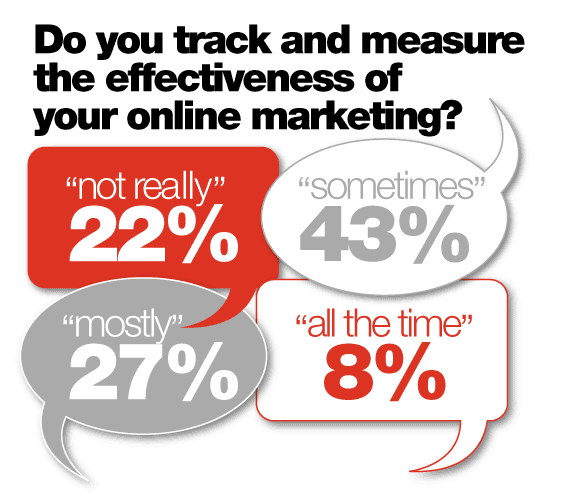
Majority of the bank marketing executives surveyed (include 49 retail banks and 93 credit unions) are not aware of how much their bank spends on online marketing. As per the Financial Brand’s author Jeffry Pilcher,


“Most financial institutions invest almost nothing in online marketing (or have no clue). This suggests one of two things. Either banks and credit unions don’t take online marketing seriously enough yet to invest in it, and/or they believe that online marketing doesn’t require a significant investment.”


Not only these. There are many more data points to look at.

  • They allocate around 5% of their marketing budgets to online activities
  • 22% do not track or measure their online activities, while only 8% do so all the time
  • 32% were not sure if their organization invests any money in online marketing
  • While most financial institutions embrace email marketing, a surprising 31% don’t.
  • 45% of banks and credit unions do not have online marketing staff at all
The other data points from the survey are 57% of banks invest in search engine optimization (SEO), while only 36% of credit unions do the same - a difference of 21%. By an even greater margin, banks are much more likely to utilize search engine marketing (SEM): 57% vs. 23%. Banks are 20% more likely to have microsites, and are 36% more likely to run banner ads than their credit union peers. Credit unions are less likely to have a mobile phone app. They are, however, more likely to have a blog, an online newsletter and ads in their eStatements. So, online marketing guys you sure have more business here. Catch them soon and if you get it, do not forget to call me for a drink.

What can be the reason as to why these banks are not using online marketing activities as other businesses do?

They seem to think that their customers and prospect already know them and their website and they hardly need to use Google to reach their website. They should understand that if they are not on top in Google or any other search engines for their business related keywords, then their competitors will sure be there on the first page and will be losing business to them. Lead generation for banks is the main source of generating business. Be it generating deposits, insurance, loans or credit cards. People still search on internet for better rates and services. If your website is not on top then your competitors website will sure be.

Being on Twitter or social media really helps to reach the public in much better way. It is a perfect channel to provide better customer service. But, it may hit you back if not done in a proper way.

PPC, banner ads, lead generation, blogging… there are many more channels to promote the banking business. They surely need to understand the results this media can get.

I will be interested to know what the readers will feel and please do comment your thoughts. Online Marketing channels is sure to be the low-hanging fruit opportunities for banks to further engage with their customers and the prospects but it is not being done.


Wednesday, July 21, 2010

White Label Websites and SEO


First of all let us know what this white label stuff is. A white-labeled website is eCommerce website which sells the products online just like the main site but, under a different domain name, brand or company name. It is altogether you have the same website, but with different skins. Usually, it is like selling the same products from different store fronts to different audience. This type of website should not be mistaken as an affiliate website but, they surely share some characteristics. They are particularly popular in the retail, travel and gambling sectors.

I would just like to list specific ways that can be used for white-label websites and how effectively they can help in your SEO campaign.

  1. Keyword-rich domain name: You may have your main website on your brand name or company name. To get the advantage of the keyword-rich domain name/s you have then white label website will be very helpful. Usually, this can be used to target the exact phrase that matches the domain name. Next strategy will be to dominate the first ranking page of the search engines using different domain names.
  2. Local Presence: If your eCommerce business requires a local touch and presence to a particular geographical area, then another brand or website which is a white label can be created having the local touch focused on localized audience. This will also help in ranking in geo-specific search engines and local search engines.
  3. Targeted Keyword Approach: Imagine you have to target 100+ keywords and this will require a lot of effort and time to rank on the first pages for all the keywords. On the other hand, imagine you have 100+ websites each catering to the target keywords. In other words you have 100+ home pages for specific keywords. In fact, to maintain these websites will be easy, as all the products and scripts will hit the same database. Thus, it not like owning 100+ website, but only one website.
  4. Link Building: White label sites will surely help in building links. As you will have more number of sites, with similar content you can surely exchange links among the different websites. Or most of the sites linking to the main site – or you can also try making a linking pyramid to help you in better ranking in search engines.

If you are building your own white-label domains make sure there is a damn good reason for you to host your content over hundreds of domains rather than just one. You need to take care your websites need not be considered for spamming. It is always better to have finite number of white label sites so that you can not only try getting better ranking in search engine, but can also share different percentage with your affiliates from these different sites. You can also try different marketing campaigns for different sites thus, will help you in lot of other ways as well. SERPS and search engine algorithms are unstable and unpredictable. It makes sense to maintain a multi-domain or even multi-brand strategy. This way you diversify your rankings and traffic sources thereby reducing risk. Thus, you have your eggs in different baskets.

White-labeling is surely going to rise in popularity and in some cases may even become an alternative to traditional affiliate marketing. Good examples of such white label sites – 888.com. They have quite a few white label sites like online-casino.com.


Read in detail on SEOmoz

Tuesday, July 20, 2010

Website Usability Checklist


Search engine optimization and other online marketing techniques get targeted traffic to your website. As per research, a visitor spends an average of less than 8 seconds on the web page. So, you have just less than 8 seconds for the visitor to do what you want them to do. Or else they will go away. So, you need to also pay proper and more attention how the website is treated by different visitors and the major portion of your visitors find the website navigation easy and comfortable. They should be able to use the site easily and should understand the content.

This is a simple usability checklist for the website.

1.      Have the navigation links easily visible. Visitors should know where they are and should easily find out where they have to go next. Also, they should know what all additional pages are there apart for the page they are on.
2.      The navigation links should be consistent and at the same place on all the pages. Visitors may get annoyed of the links appear and disappear unpredictably. The best practice is to use include files for the navigation system. This will ensure the changes made to this are effected on all the pages.
3.      Use appropriate anchor text. As the anchor text is important for search engine optimization, do not stuff them with main keywords without considering to which page it will lead to after clicking. Make the anchor text more meaningful at the same time so that the visitor will know where they will be moved to on clicking. Don’t keep them guessing as to where the link is going to take them.
4.      It is a normal practice to highlight the anchor text so that it conveys the message that the visitor has to click it. Usually, the anchor text is underlined or used in a different font or bold font. It is always a best practice to use CSS to emphasize the text links.
5.      You can use JavaScript or other scripting language to create menus for the navigational links. Just take care that the visitor can easily navigate through the link structure in the menu.
6.      Home page link is a must in the list of navigation items you have. Also, the logo should always be linked to the home page.
7.      Include site search box on every page of the website. If the visitor can’t find what they need, they should be easily guided to the search box. Moreover, if you refer the search keywords, you will know what information is searched more number of times and what should be made easily available to the visitor. Thus, prominently displaying the search box will help in improving a website.
8.      Always use breadcrumbs to let the visitor know on which page he is on and how they have navigated to the page.
9.      Always have your main content and call-to-action lines on the top or above the fold. Do not expect the visitor to scroll down, read and then click.
10.  Use proper background color and font color so that it gels with your brand and branding. Moreover, the content should be easily readable by the visitors.
11.  Always use ALT and TITLE attributes to all images. Some browsers may block images so in this case the visitor can read the ALT text.
12.  Have a custom error page that will help a visitor when clicked on a broken link or type the address incorrectly. The custom error page should be in synch with the website design and structure.
13.  Have a feedback form to always dope you with you information that will help you to increase the performance of the website. Try to improve the usability depending on the feedback you receive. The users of the site can tell you exactly how they are feeling about it.

Your website is designed just not for you but, for the ones who use it – your visitors who are your customers. A site that confronts to users’ expectations, makes them more comfortable and more compelling to visit again. Good usability is always critical to website’s business.


Don't Make Me Think: A Common Sense Approach to Web Usability, 2nd Edition

Thursday, June 24, 2010

Google to Woo Indians with Localized Products

After Xerox, only Google has the rare privilege to enter in the Merriam-Webster Dictionary. It says, to google is to use Google search engine to seek information on the World Wide Web. No wonder Google is a great brand all over, but when it comes to India the online market is quite different from the rest of the world here. The strategies and products to the Indian market should be localized having the Indian masala formulae which other products have followed say for example Maggi noodles or Lays. They understand the Indian masses tastes and changed the strategy to conquer the Indian market.

Why India?
  1. Internet is penetrating at a fast pace. With 7% penetration and 50% year-on-year growth and the vast population makes India as the favorite destination
  2. China market which is similar to India’s has some issues with Google. Pakistan is also following the same path. Thus, the best thing for Google is to shift the focus to India
  3. Baidu in China controls the major portion of search traffic. Google will not have such competition in India
  4. Major portion of Indian internet users can speak and understand English
Google knows that major part of Indian population is not conversant in English. It will be difficult to increase the user base. Thus, they have hit upon to go beyond English to offer products in local languages and started educating the people about the internet and its advantages. Thus, creating the awareness for Google and its products. They did miss the mobile internet space as well. The introduction of landmarks to Google maps apart from the street names makes it a very useful product for Indians. Google kicked off its mobile services by offering an SMS search some three years ago.

Frost & Sullivan’s Saif says the clue to Google’s success in India lies in its focused approach. Instead of spreading itself too thin like most of its competitors, Google has chosen instead to focus on a few segments. And it is taking a long-term view in each of the categories - a nicely woven strategy to target the Indian market. But, this surely rings the warning bells as Yahoo and Bing can realize their mistakes and would try to take advantage of the awareness created by Google. But, Google is Google at last.


Reference: Outlook Business, June 2010 issue


What Would Google Do?